
How to Access Deleted Pages in Squarespace
Accidentally deleting a page in Squarespace can feel stressful, but the platform gives you a built‑in way to recover deleted content quickly. If you’ve ever searched for how to access deleted pages in Squarespace or needed to recover deleted pages in Squarespace after a redesign, this guide walks you through the exact steps. Squarespace stores deleted pages in a hidden area called the Trash, and you can restore them with a single click.
How to Access Deleted Pages in Squarespace
Steps:
Open your Squarespace site editor.
Go to the Pages panel.
Scroll to the very bottom until you see the Trash section.
Click Trash to open it.

Inside the Trash, locate the page you want to restore.
Hover over the page and click Restore.
The page will return to the Not Linked section.
Your deleted page is now fully recovered and ready to be placed anywhere in your navigation.
How to Restore Deleted Content in Squarespace
When you restore a deleted page, Squarespace brings back:
• All content blocks
• Layout and formatting
• Page settings • SEO settings
• URL slug (unless it conflicts with an existing page)

This makes it easy to undo mistakes or retrieve content you thought you no longer needed.
How Long Deleted Pages Stay in Trash
Squarespace keeps deleted pages in the Trash indefinitely unless you manually empty it. This means you can recover deleted pages in Squarespace weeks or even months later, as long as you haven’t permanently removed them.
If you empty the Trash, the content cannot be restored.
What to Do After Restoring a Deleted Page
Once your page is restored:
Open the Pages panel. Find the restored page in Not Linked. Drag it into Main Navigation, Secondary Navigation, or keep it hidden. Review the content to ensure everything looks correct.
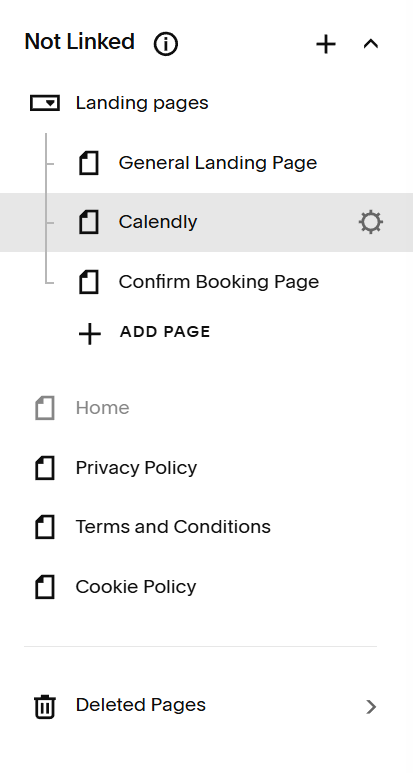
This gives you full control over where the recovered page lives on your site.
Why You Might Need to Recover a Deleted Page
Restoring deleted pages is especially helpful when:
• You accidentally removed a live page
• You’re redesigning and want to compare old layouts
• You need to reuse content from a previous version
• A team member deleted something unintentionally
• You’re migrating content to a new site structure
Squarespace’s Trash system acts as a safety net, making it easy to undo mistakes.
Ready to Keep Your Site Organized and Protected?
If you want help recovering deleted content, restructuring your site, or creating a safer workflow for managing pages, I’d be happy to support you. A clean, intentional page structure makes every redesign smoother and every update more confident.
